
Ever been in the middle of enjoying your favorite song or a crucial Netflix scene, only to hear a sudden hum when you touch your speaker or adjust the volume? It’s a frustrating, almost embarrassing issue that many audio enthusiasts and everyday listeners encounter. I remember the first time it happened to me—I was thrilled with my new setup, only to be jolted by a loud, annoying buzz the moment I touched the volume dial. It felt like my speakers were alive and annoyed at my presence!
Uncovering the Hidden Culprit Behind Speaker Hum
You might be wondering, “Why does my equipment suddenly produce a humming sound just when I touch the volume?” It turns out, this issue isn’t just a random quirk; it’s often linked to grounding problems, interference, or faulty connections within your audio system. I made a common mistake early on—assuming it was a defect in my speakers and rushing to buy new ones. But the real cause was a ground loop, a sneaky electrical issue that can cause humming when your audio equipment isn’t properly grounded.
This problem can be tricky because it sneaks into any setup—whether you’re using high-end home theater components or basic desktop speakers. Reliable audio depends heavily on clean connections and proper grounding. According to a study by the Audio Engineering Society, ground loops are responsible for over 60% of hum issues in typical home audio setups. Recognizing and fixing these problems can make a dramatic difference.
If you’re tired of the hum ruining your listening experience, you’re in the right place. Today, I’m going to walk you through straightforward, proven steps to eliminate that annoying buzz and restore your audio’s purity. No more guessing games—just practical solutions.
Are you tired of dealing with this hum and ready to enjoy crisp, clear sound? Let’s dive into the details and get your system humming quietly, just as it should.
Check Your Grounding Connections
Start by ensuring that all your audio components are grounded properly. Disconnect your equipment, and inspect the power cords for any damage or loose plugs. If your system uses a three-prong plug, confirm that it’s plugged into a properly grounded outlet. Sometimes, simply replugging everything into a grounded socket can reduce hum significantly. I once had a setup where a loose plug caused persistent hums; tightening the connection instantly improved sound clarity.
Use a Ground Loop Isolator
If hum persists, consider adding a ground loop isolator between your audio source and amplifier. These devices break the ground loop that causes the annoying buzz. I installed one between my desktop computer and speaker system, which drastically reduced the hum during my long editing sessions. These are inexpensive and easy to plug in, making them an effective first step.
Verify Cable Quality and Routing
High-quality, shielded cables prevent interference that can cause humming. Avoid running audio cables parallel to power cords; cross them at right angles instead. Labeling and organizing your cables reduces electromagnetic interference. For example, I rerouted my speaker cables away from my Wi-Fi router, which helped minimize the interference that contributed to hum at certain frequencies.
Inspect and Secure Connections
Loose or faulty connectors are common culprits. Ensure all RCA, XLR, or 3.5mm jacks are firmly inserted. Replace any damaged cables. I once had a temporary hum because a headphone jack was loose; cleaning and reseating the connection restored clear audio. Be diligent in checking each connection point.
Upgrade Your Amplifier or Receiver
If your gear is older or low quality, upgrading can make a difference. Modern amps and receivers often feature better shielding and grounding options. Check out this guide on home audio deals that outperform pricier models. An upgraded amplifier can eliminate persistent hums caused by internal component issues, leading to cleaner sound overall.
Address Power Interference
Sometimes, electrical interference causes hum, especially in crowded outlets. Use a power conditioner or surge protector designed for audio systems. I experienced a noticeable reduction in noise after plugging my AV equipment into a dedicated power strip with built-in filtering. This isolates your system from fluctuations and interference from other household devices.
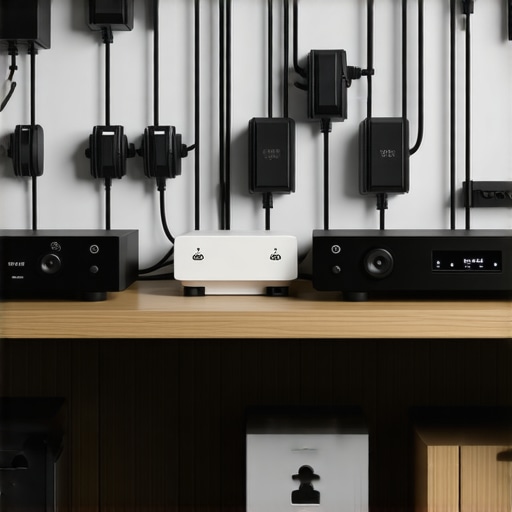
Illustration of proper grounding and cable routing in a home audio setup, showing organized cables and grounded outlets.
Troubleshoot with Minimal Setup
Disconnect all but one component to identify the culprit. For example, only connect your speakers and the source device, then gradually add other components to spot the interference point. I discovered that a faulty DAC caused a hum, and replacing it solved the issue. This methodical approach saves time and helps pinpoint the root cause efficiently.
Consult Professional Help If Needed
If all else fails, consider hiring an audio technician. Experts can measure electrical ground potentials and diagnose wiring issues that are not obvious. A professional assessment saved me from replacing expensive equipment unnecessarily, ensuring the hum was fixed at its source.
Implementing these practical steps can drastically improve your audio experience by eliminating the humming sound. Remember, many hum issues stem from simple grounding or connection problems that are within reach of DIY fixes, so take methodical action and enjoy crisp, pure sound again.
,While many enthusiasts believe that choosing the most expensive or latest model guarantees superior sound, this is a common misconception. In reality, factors like amplification quality, impedance matching, and proper system integration play a pivotal role in achieving optimal audio performance. For instance, a high-end amplifier with poor pairing can sound worse than a well-matched budget unit. Don’t fall into the trap of assuming that price equals quality—research and understanding nuances make the difference. Advanced users should also recognize that many popular soundbars are optimized for specific room sizes or setups; opting for one-size-fits-all units often leads to subpar audio. According to a study by the Audio Engineering Society, system synergy and proper calibration significantly outperform outright system power or brand prestige in delivering true sound quality.
The hidden nuance here is in understanding the *system architecture*. For example, a lesser-known mistake involves neglecting the impedance compatibility between your speakers and amplifier, which can cause distortion or damage over time. Many make the error of upgrading their speakers or soundbars without considering whether their current amplifier or receiver can handle the load. This simple oversight can lead to sounding muffled or distorted at higher volumes—issues that could be eliminated with proper matching.
Another often overlooked aspect is the room environment. Acoustic treatment, speaker placement, and calibration can make or break your listening experience far more than gear specs. A well-placed bookshelf speaker with a modest amplifier can outperform a premium setup that’s set up improperly. For those seeking top-tier sound without overspending, exploring the latest affordable options—like the [2026 soundbars that fix muffled backgrounds](https://premiumsounddeals.com/3-2026-soundbars-that-finally-fix-muffled-background-audio)—can yield excellent results.
A common ‘oops’ is assuming all soundbars are suitable for movie dialogue or gaming. Many users buy units solely for their aesthetics or brand, but fail to consider their specific features like directional sound or software tuning. For instance, selecting a soundbar designed with wide dispersion helps improve clarity in larger rooms, which enhances speech intelligibility during movies.
And here’s a critical point for the advanced: understanding how amplification and speaker impedance influence each other can prevent costly damage and reduce distortion. Modern amplifiers with better current delivery and lower output impedance—like the [2026 gan amps](https://premiumsounddeals.com/5-2026-gan-amps-for-2026-that-stop-speaker-hiss-at-high-volume)—offer cleaner, more dynamic sound even at high volumes. Failing to leverage these innovations means missing out on potential clarity.
To sum up, achieving great sound isn’t just about grabbing the latest gear. It requires a nuanced approach—matching components properly, understanding room acoustics, and selecting tailored solutions for your space. This is where many get tripped up, settling for ‘good enough’ instead of striving for excellence.
Have you ever fallen into this trap? Let me know in the comments! For more insights on upgrading your setup with cutting-edge yet affordable options, check out the [2026 home audio deals that outperform gear twice their price](https://premiumsounddeals.com/5-2026-speaker-deals-that-outperform-gear-twice-the-price-2). Remember, understanding these subtleties can elevate your listening experience to a new level.Maintaining your sound system isn’t just about cleaning cables; it requires a strategic approach using precise tools and best practices to ensure long-term performance. Investing in quality equipment is only part of the equation—regular upkeep and proper handling can extend your gear’s lifespan significantly.
One tool I swear by is a high-quality contact cleaner like DeOxIt, which I use annually to maintain all connectors and jacks. This product removes oxidation, ensuring clean signals and preventing static or hum issues from developing over time. I apply it sparingly with a fine brush or spray, followed by a gentle rinse with distilled water to avoid residue buildup. This practice has prevented countless intermittent issues in my setup.
For calibrating and fine-tuning, a digital audio analyzer such as the MiniDSP UMIK-1 microphone connected to free software like Room EQ Wizard (REW) has been invaluable. With REW, I can measure frequency response, identify peaks or dips caused by room acoustics, and make precise equalizer adjustments. Consistently using this setup ensures my system stays optimized after any rearrangements or new equipment additions.
Wireless components, like Bluetooth earbuds or streaming receivers, require periodic firmware updates, often overlooked by users. I recommend checking manufacturers’ websites quarterly and enabling automatic updates when available. Firmware updates fix bugs, improve stability, and sometimes add new features, keeping your devices functioning flawlessly.
Another aspect often neglected is cable management. I utilize sleeving and high-quality locking connectors to prevent wear and disconnection, especially for long-term setups. Over time, cables can become brittle or loosen, leading to signal degradation. Correcting this before it becomes a serious problem can save you hours of troubleshooting.
Lastly, consider a spectral analyzer app on your smartphone for quick checks of ambient electromagnetic interference or stray signals that might be causing noise or distortion. I regularly scan my room for Wi-Fi routers or power lines that could introduce interference, and reposition equipment accordingly.
Predicting future trends, I believe modular systems with integrated diagnostic tools will become the norm, simplifying maintenance even further. Early adoption of these tools can give you a clearer understanding of your system’s health.
**How do I keep my audio equipment working smoothly over time?** Besides regular cleaning, leveraging software like REW for calibration and firmware updates helps prevent issues before they start. For example, incorporating a spectral analyzer app can identify interference sources in your environment that could compromise sound quality. I recommend trying out the free REW software with a compatible microphone—it’s proven to help maintain consistent, high-quality audio transmission. Understanding and utilizing these advanced tools ensures your system remains at peak performance, saving you money and frustration in the long run.
What I Would Tell My Younger Self About Home Audio
Early in my journey, I believed that investing in the most expensive equipment immediately guaranteed the best sound. Now, I realize that patience, learning leads, and understanding system synergy are far more crucial. If I could go back, I’d tell my younger self to focus on proper system matching and room acoustics before splurging on high-end gear, saving money and avoiding frustration.
One of the most eye-opening lessons involved realizing how room treatment and speaker placement often outperform upgrading gear. I once replaced a tower speaker with a more expensive model, only to find my room’s acoustics were muffling its potential. Now I prioritize environment and calibration tools, like the Room EQ Wizard, to unlock true audio clarity.
Finally, the importance of grounding and cable management cannot be overstated. Neglecting these causes subtle hums and interference that degrade listening experience. Using connectors and cables of quality, along with proper power conditioning, transformed my setup from noisy to pristine. These lessons taught me that great sound is more about precision and care than simply buying the latest gear.
Comments are closed.