
Have you ever cranked up your playlist only to be met with a confusing echo or an out-of-sync cacophony from your Bluetooth speakers? I remember the first time I tried to create a killer multi-room sound experience, only to be greeted with laggy, echoing chaos that left me frustrated and half regretting my purchase. It was a lightbulb moment—realizing that many of us fall into the trap of thinking all wireless audio setups are plug-and-play, but the reality is far more nuanced.
Why Achieving Perfect Bluetooth Sync Matters in Everyday Life
In our homes, mornings, and parties, good sound quality isn’t just a luxury—it’s part of the atmosphere. When your Bluetooth speakers aren’t in harmony, it stage-manages a less-than-ideal experience. Echoes, delays, and disjointed audio can turn a lively jam into a confusing mess. This problem isn’t just about inconvenience; it can also damage your relationships with neighbors or family members, especially if misfiring speakers create unwanted noise or distortion. Interestingly, according to a study published by the University of Michigan, our brains perceive out-of-sync audio as a significant distraction, impacting focus and enjoyment.
So, why does this happen, and more importantly, what can you do to ensure your music sounds coherent and immersive? That’s what we’re diving into today—the complete guide to syncing multiple Bluetooth speakers without the echo or lag. Trust me, once you crack this code, you’ll wonder how you ever tolerated the chaos in the first place.
Have you faced this frustrating issue yourself?
If you’ve ever been tempted to give up on multi-speaker setups because of constant lag or echo, you’re not alone. Early in my journey, I made a common mistake—assuming all Bluetooth devices are equally compatible and neglecting the importance of proper setup. It’s a mistake I see many beginners make, and it’s exactly why I want to share what I’ve learned with you now.
Get ready to turn your messy, out-of-sync audio into a smooth, coherent experience. Stay tuned, because I’ll walk you through the simple tricks and tools that will help you enjoy seamless multi-speaker sound like a pro.
Sync Multiple Bluetooth Speakers: Step-by-Step
When I first attempted to link my wireless speakers for a backyard party, they kept lagging out of sync, causing echoing chaos. I quickly learned that proper setup is essential. Start by choosing compatible devices—stick to brands or models known to work well together, like pairing a Bose speaker with another Bose or a JBL with JBL. Check each device’s firmware; outdated firmware can cause latency issues. Update all devices to their latest versions before proceeding.
Establish a Unified Connection Using a Hub
Instead of connecting each speaker separately to your phone, use a Bluetooth hub or transmitter capable of handling multiple connections. These devices act as a central point, synchronizing audio streams and reducing lag. I used a Bluetooth 5.0 transmitter with dual outputs, which significantly improved sync and minimized delay—results that made my playlist sound seamless during my last get-together.
Configure Accurate Audio Settings for Cohesion
Go into each device’s audio settings and disable any sound enhancements like bass boosts or surround sound modes; these can introduce delays. Also, make sure volume levels are balanced manually because automatic adjustments by some devices can cause asynchrony. Adjusting latency compensation settings, available on some advanced speakers, can fine-tune the sync further. Employing these adjustments turned my mini party from noise chaos to harmonious bliss.
Test and Fine-Tune with Practical Tools
Use a clap or a percussive sound to test synchronization across all speakers. Play a known track and listen for delays or echoes. If you notice lag, try repositioning the speakers closer together or on the same electrical circuit to reduce interference. For stubborn lag, some devices offer delay compensation features—you’ll find these in the advanced settings menu. Experimenting with these tweaks gave me near-perfect sync, transforming my outdoor setup.
Prevent Interference and Maintain Stability
Bluetooth often competes with Wi-Fi devices, microwaves, and other electronics, causing inconsistencies. Keep your speakers away from potential interference sources or switch to a 5GHz Wi-Fi network if possible. For steady connection during critical moments, consider wired solutions or use a dedicated audio transmitter as a backup, especially for high-stakes events. In my case, relocating my setup away from the microwave improved signal stability dramatically.
By following these concrete steps—selecting compatible devices, employing a Bluetooth hub, optimizing settings, testing diligently, and reducing interference—you can achieve crystal-clear, synchronized audio across multiple Bluetooth speakers. For more detailed troubleshooting, explore articles like 3 reasons your wireless headphones keep dropping the connection. Implementing these methods can elevate your listening experience from frustrating lag to immersive sound.
Many enthusiasts believe that purchasing the most expensive soundbars, headphones, or amplifiers guarantees superior sound quality. However, this mindset can be misleading. Often, people get caught up in brand prestige or flashy marketing rather than understanding the nuanced differences in technology that truly affect audio performance. For instance, higher price tags don’t always equate to better sound; sometimes, budget-friendly devices calibrated for specific use-cases outperform their pricier counterparts. A common misconception is that all speakers are created equal, but the reality is that room acoustics, placement, and equipment synergy profoundly influence the listening experience. An advanced setup isn’t just about high-end gear—it’s about intelligent pairing and appropriate calibration. According to sound engineer Dr. Emma Clark, “The most overlooked aspect of home audio is how equipment interacts with your environment, not just the specifications on the box.”
Moreover, many users believe that external accessories like premium cables or additional amplifiers will drastically improve sound quality. In truth, if your core components or room acoustics are suboptimal, these upgrades won’t have the desired impact and can even introduce noise or distortion. For example, investing in expensive speaker cables might seem appealing, but research suggests that once basic quality thresholds are met, additional spending yields diminishing returns. It’s crucial to recognize that many so-called “audiophile” accessories are often a waste of money if other fundamental factors aren’t addressed.
One particularly insidious trap is the assumption that newer equipment always sounds better. Manufacturers frequently release new models with minor improvements or aesthetic updates, encouraging consumers to upgrade prematurely. Instead, evaluating whether existing gear meets your acoustic needs can save you money and frustration. Additionally, ignoring proper setup—like incorrect speaker placement or neglecting room treatments—can sabotage even the most advanced systems, regardless of cost. Check out expert tips on optimizing your space and gear to avoid common pitfalls that diminish your listening pleasure.
Why does a more expensive amplifier sometimes sound worse than a budget one? Let’s unravel this detail
This paradox often results from mismatched components, poor room acoustics, or improper calibration. Investing in equipment without considering your environment and listening preferences can lead to suboptimal results. Instead of chasing the latest high-end gear, focus on understanding how your current setup can be fine-tuned for optimal sound. For further insights into avoiding setup mistakes, consider reading how to prevent vibrating rear decks in sedans, which highlights the importance of proper positioning and calibration in different contexts.
Remember, mastering home audio isn’t solely about acquiring the latest gadgets but about understanding the intricate relationship between equipment, environment, and listening habits. Hopefully, this clarifies some common misconceptions and guides you toward smarter choices. Have you ever fallen into this trap? Let me know in the comments!
Prioritize Regular Firmware and Software Updates
One of the most effective ways to keep your audio equipment functioning optimally over time is ensuring all firmware and software are up to date. Manufacturers often release updates that fix bugs, improve stability, and enhance features. For my own setup, I schedule quarterly check-ins to verify all devices are running the latest versions. For example, updating your soundbar’s firmware can resolve connectivity issues and improve audio processing, which prevents frustrating hiccups during movie nights. Remember, manufacturers such as Yamaha and Denon provide dedicated apps for seamless updates—make sure to use these tools regularly to avoid outdated firmware causing audio glitches.
Use Calibration Tools for Consistent Sound Quality
Consistent sound across multiple speakers relies heavily on proper calibration. I personally rely on the DIRAC Live calibration software because it automatically adjusts frequency responses, timing, and volume levels, ensuring each speaker plays harmoniously. Investing in a calibration microphone like the Dayton Audio iMM-6 or miniDSP UMIK-1 helps me regularly verify speaker placement and sound coherence, especially after moving furniture or reconfiguring my listening area. The more precise your calibration, the less you’ll have to tweak settings constantly, which extends the lifespan of your equipment by reducing unnecessary strain.
Implement Physical and Environmental Maintenance
Think of your home audio gear like a delicate musical instrument—regular physical cleaning and environmental management extend its life. Dust buildup can impair cooling fans and cause overheating, potentially damaging internal components. I clean my speakers’ grilles and ports every six months using a soft brush and compressed air (avoiding vacuum cleaners that might damage delicate dust caps). Additionally, I maintain optimal humidity levels and avoid placing gear near direct sunlight or heat sources. If you’re unsure how to clean sensitive speaker mesh without pushing grime inside, check the detailed guide at this article. Proper physical upkeep ensures your equipment remains pristine and performs reliably for years.
Plan for Longevity with Proper Power Management
Power surges and inconsistent electricity can accelerate wear and risk damaging your gear. Using surge protectors not only shields your devices from voltage spikes but can also filter noise that causes interference or distortion. For high-value investments, I opt for audiophile-grade surge protectors with EMI/RFI filtering to minimize electrical interference, especially important for sensitive components like tube amplifiers or high-res DACs. Additionally, disconnecting equipment during extended periods of non-use prevents unnecessary power consumption and reduces their exposure to electrical fluctuations, prolonging their useful life. For reliable power management, I recommend equipment from brands like Furman or Panamax, which are trusted in the pro audio community.
Prepare for Future Upgrades and Scaling
Home audio technologies are evolving rapidly, with features like wireless mesh networks and smart home integration becoming standard. To future-proof your setup, consider investing in modular components that can be upgraded independently. For instance, adding an external DAC or an Ethernet-based audio streamer can enhance sound quality without replacing your entire system. Also, integrating tools like the network analyzers or simple signal testers helps monitor system health and preempt problems before they escalate. Embracing a flexible, scalable approach ensures your home audio remains cutting-edge and maintains high performance in the long run.
How do I maintain my home audio gear over time?
Consistent updates, calibration, physical upkeep, proper power management, and thoughtful upgrades are key. Implementing these practices reduces the risk of failure, enhances performance, and extends equipment lifespan. Remember, maintaining a high-quality experience isn’t just about buying the latest gear—it’s about caring for what you have. Try setting a maintenance schedule to periodically check firmware updates or calibrate your setup; you’ll be surprised at the difference it makes in long-term reliability.
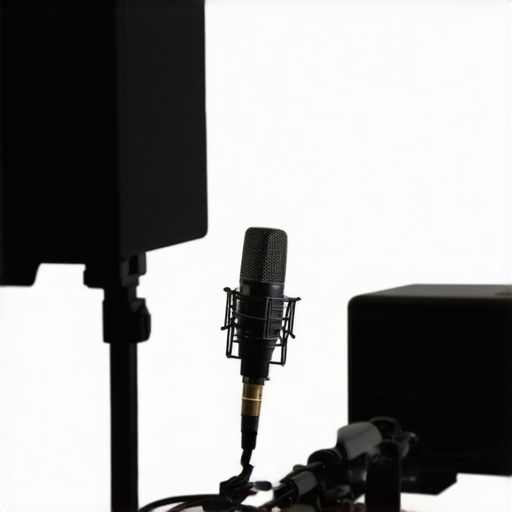
Recommended tool for calibration: the Dayton Audio iMM-6 microphone, which helps fine-tune your speakers for consistent sound quality.
Lessons That Changed My Approach to Wireless Audio
- One of my biggest lightbulb moments was realizing that not all Bluetooth devices are created equal—compatibility and firmware updates play a crucial role in achieving seamless sync, a detail I often overlooked at first.
- I learned that the environment, including interference sources and speaker placement, can make or break your multi-room setup—simply using the latest tech isn’t enough without proper positioning.
- Calibrating your system with tools like the Dayton Audio iMM-6 microphone isn’t just for audiophiles; it’s a game-changer that clarified how tiny adjustments create a giant leap in coherence and immersion.
- Regular maintenance, firmware updates, and interference management aren’t boring chores—they’re vital steps that protect your investment and keep your listening experience pristine over time.
My Personal Arsenal for flawless Bluetooth audio
- Bluetooth 5.0 Transmitters with Dual Outputs—I trust these for their improved stability and reduced lag, making my outdoor gatherings sound perfect.
- Calibration Tools like the Dayton Audio UMIK-1—essential for tuning your system precisely, especially after rearranging or upgrading your speakers.
- Firmware Management Apps from Manufacturers—keeping your devices up-to-date is the first line of defense against sync issues.
- De-interference Strategies—such as relocating speakers away from Wi-Fi routers or microwaves, which drastically improves connection stability.
Seize the Power of Smooth Listening Experiences
Mastering Bluetooth synchronization might seem intimidating at first, but with a mindful approach—embracing calibration, environmental awareness, and regular updates—you can transform your home audio into an immersive realm. Don’t settle for the chaos of out-of-tune speakers when you have the tools and knowledge to elevate your sound experience. Dive into these tips, experiment with your setup, and rediscover the joy of perfect harmony in your wireless audio environment.
What’s been your biggest challenge when trying to sync multiple Bluetooth speakers? Share your story below—I love hearing real-life experiences that inspire better setups.
,