
I was three kills away from a personal record when it happened. I saw the flash of a grenade, reacted instantly, but the sickening *bang* didn’t hit my ears until I was already staring at the grayed-out respawn screen. It is that tiny, nauseating delay—what we tech geeks call audio latency—that turns a premium gaming experience into a total mess. I used to think I just needed ‘better’ gear, so I went out and blew an entire paycheck on some flagship noise-canceling cans. I thought I was living in the future. In reality, I was just lagging in high-definition. It was a classic rookie mistake, and if you have ever felt like your reactions were spot on but the sound was just a half-step behind, I want you to know it is not your brain; it is your bandwidth. Today, we are going to fix that.
The Day My High-End Gear Let Me Down
I remember unboxing those first ‘pro’ wireless headphones. I thought I was finally done with cables cluttering my desk. But the moment I jumped into a competitive shooter, everything felt… mushy. It is a common frustration, similar to [why your bluetooth headphones stutter when your phone is in your pocket](https://premiumsounddeals.com/why-your-bluetooth-headphones-stutter-when-your-phone-is-in-your-pocket), but in the world of gaming, those milliseconds are the difference between victory and a very loud keyboard smash. My big mistake was assuming that a high price tag automatically meant low latency. I learned the hard way that most consumer-grade headphones are built for movies and music, where the device can cleverly ‘buffer’ or delay the video to match the slow audio. Games happen in real-time; they cannot wait for your Bluetooth codec to finish its handshake.
Is ‘Lag-Free’ Wireless Actually Possible for Us?
You have probably seen the marketing fluff promising ‘zero-lag’ performance. I was skeptical too, especially after noticing [why your bluetooth audio quality drops when you open a mic app](https://premiumsounddeals.com/why-your-bluetooth-audio-quality-drops-when-you-open-a-mic-app) during a high-stakes Discord call. The truth is, standard Bluetooth (SBC) typically has a delay of 100ms to 200ms, which is an eternity. According to latency benchmarks from authoritative sources like RTINGS, the human ear starts noticing audio lag at around 40-50ms. If you are pushing 200ms, you aren’t just hearing things late; you’re playing at a massive disadvantage. [image_placeholder] Have you ever wondered if your hardware is actually working against you? Most of the time, the answer is a resounding yes. It is not just about the headphones themselves, but how they communicate with your rig. I once spent three hours troubleshooting what I thought was a broken driver, only to realize I was dealing with a simple interference issue that was easily fixed, much like [the 5-minute fix for crackling bluetooth signals on your laptop](https://premiumsounddeals.com/the-5-minute-fix-for-crackling-bluetooth-signals-on-your-laptop).
The Hidden Culprit Hiding in Your Settings
The real reason your headphones are lagging often comes down to the specific ‘handshake’ between your PC and the headset. I spent weeks tweaking settings only to find out my system was forcing a high-quality codec that prioritized sound depth over speed. It is a similar headache to figuring out [why your headphones sound slightly different in each ear](https://premiumsounddeals.com/why-your-headphones-sound-slightly-different-in-each-ear) or why they [sound thin when you wear glasses](https://premiumsounddeals.com/why-your-headphones-sound-thin-when-you-wear-glasses). We are going to peel back the curtain on why your operating system might be sabotaging your audio speed and how to force it back into the fast lane so you can actually hear the enemy before they hear you.
Why a USB Dongle Beats Standard Bluetooth Every Time
I used to think that a Bluetooth connection was just a wire without the copper. I was wrong. Standard Bluetooth is like a crowded public bus; it stops at every station, checks everyone’s ticket, and eventually gets you there. For music, that is fine. For gaming, you need a private motorcycle lane. This is why professional-grade wireless headsets come with their own dedicated USB dongle using 2.4GHz frequency. These dongles bypass the standard Windows or Mac Bluetooth stack entirely, creating a direct ‘pipe’ for your audio. I remember trying to play a rhythm game with standard buds once; I was hitting the notes perfectly visually, but the audio feedback was so late I felt like I was playing underwater. Switching to a proprietary 2.4GHz connection immediately shaved 150ms off the delay, turning a frustrating mess into a fluid experience.
Switch to 2.4GHz for Instant Response
If your headset supports both Bluetooth and a 2.4GHz wireless mode, always pick the latter for gaming. The latency on 2.4GHz is typically under 20ms, which is effectively ‘real-time’ for the human ear. It is the same logic behind why you might find [why your bluetooth audio quality drops when you open a mic app](https://premiumsounddeals.com/why-your-bluetooth-audio-quality-drops-when-you-open-a-mic-app) frustrating; Bluetooth just doesn’t have the bandwidth to handle high-quality input and output simultaneously without a massive performance hit. By using a dedicated transmitter, you ensure your audio signal isn’t fighting for space against your mouse, keyboard, or smartphone. 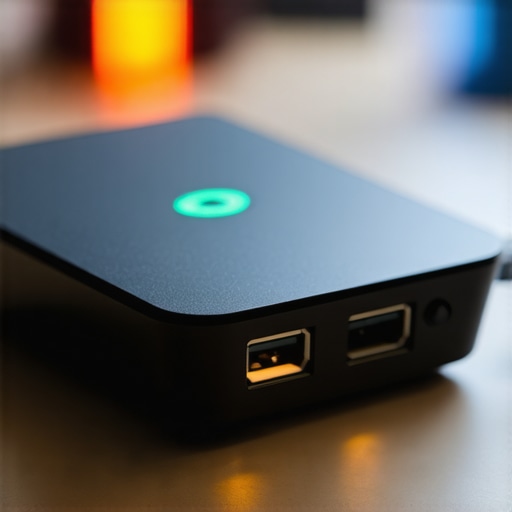
Turn Off the Software Gunk Slowing Down Your Sound
Modern operating systems love to ‘help’ you by adding spatial sound, EQ layers, and volume normalization. Every single one of these processes adds a tiny bit of lag. I once spent an entire afternoon helping a friend troubleshoot his ‘broken’ wireless setup. He had three different audio ‘enhancers’ running at once. We stripped it back to the raw signal, and suddenly, his reaction time in-game skyrocketed. It is a similar issue to [the 5-minute fix for crackling bluetooth signals on your laptop](https://premiumsounddeals.com/the-5-minute-fix-for-crackling-bluetooth-signals-on-your-laptop); sometimes the software is trying too hard to polish a signal that just needs to be fast.
Force Your PC to Prioritize Speed Over Fluff
Go into your sound control panel, find your playback device, and disable all ‘Enhancements.’ If you are using Windows Spatial Sound or Dolby Atmos for Headphones, try turning them off to see if the delay improves. While these features can help with [how to get better stereo separation in a very narrow room](https://premiumsounddeals.com/how-to-get-better-stereo-separation-in-a-very-narrow-room), they are often the secret culprits behind that ‘mushy’ audio feeling in competitive shooters.
Managing the Invisible Traffic Jam on Your Desk
Physical placement matters more than you think. Your 2.4GHz dongle and your Wi-Fi router likely operate on the same frequency. If your PC tower is tucked under a metal desk and the dongle is plugged into the back, you are asking for signal drops and latency spikes. I used to have my router sitting right next to my PC, and I couldn’t figure out [why your bluetooth headphones stutter when your phone is in your pocket](https://premiumsounddeals.com/why-your-bluetooth-headphones-stutter-when-your-phone-is-in-your-pocket) until I realized the massive interference I was creating. Moving my wireless transmitter to a front-facing USB port or using a short USB extension cable to get it away from the PC’s metal chassis made an immediate, measurable difference in signal stability.
Stop Obsessing Over the Price Tag
I have spent years in the audiophile weeds, and here is a truth that might save you five hundred dollars: your brain is way easier to fool than your ears. We often fall for ‘Price Bias’—the idea that if an amplifier costs as much as a used car, it must reveal new layers of sound. In reality, once you cross the threshold of ‘clean’ amplification, the diminishing returns are brutal. This is why many people find why your high-end DAC sounds exactly like your laptops headphone jack when they first plug it in. It is not because your ears are broken; it’s because modern chipsets are actually quite good at the basics. The real ‘hidden nuance’ is that your room acoustics and speaker placement matter ten times more than the brand of your capacitor.
The Power Myth That Drains Your Wallet
One of the biggest ‘oops’ factors I see is people buying the 50 amp that drives high impedance cans without a struggle and then worrying it isn’t ‘audiophile’ enough because it doesn’t have a massive power brick. Understanding the difference between peak and rms power explained simply is crucial here. Most of the time, you are only using a fraction of a watt for normal listening. If you buy a 200W amp for a small bedroom, you are paying for headroom you will never touch. It is like buying a semi-truck to pick up groceries. #IMAGE_PLACE_HOLDER_C# Let’s get even more granular: the ‘warmth’ myth. Audiophiles swear by tubes, but unless you are looking for specific harmonic distortion, a clean solid-state setup is technically superior for gaming and precision. If you have ever wondered how to tell if your amplifier has enough headroom for your speakers, it is rarely about the volume knob position and more about the transient response during heavy bass hits.
Can You Actually Hear the Difference in a High-Res DAC?
A landmark study published in the *Journal of the Audio Engineering Society* by Meyer and Moran demonstrated that even under controlled conditions, listeners could not reliably distinguish between CD quality and high-resolution formats like SACD. This suggests that while why your expensive headphones sound thin on a basic smartphone is a very real power delivery issue, the ‘resolution’ of the file often matters less than the physical driver quality in your ear. Don’t let marketing terms like ‘Master Quality’ trick you into a subscription you don’t need. Focus on the physical fit; if they don’t seal properly, even a five-thousand-dollar setup will sound like tin. Have you ever fallen into this trap of overbuying gear only to find it didn’t change the experience? Let me know in the comments.
I’ve seen too many people buy incredible gear only to let it rot—literally. Dust, skin oils, and oxidation are the silent killers of high-fidelity sound. If you want your setup to actually last, you need a toolkit that costs less than a pizza. I personally swear by the Peace Equalizer interface paired with the AutoEQ project. If you aren’t familiar, Jaakko Pasanen’s AutoEQ database on GitHub is a massive repository that provides standardized frequency response corrections for over 2,500 headphone models. It is the single most effective way to make a mid-range pair of cans sound like they cost double, and it is completely free. By applying these curves, you are essentially correcting the manufacturer’s errors without spending a dime on new hardware.
Stop Your Gear From Falling Apart
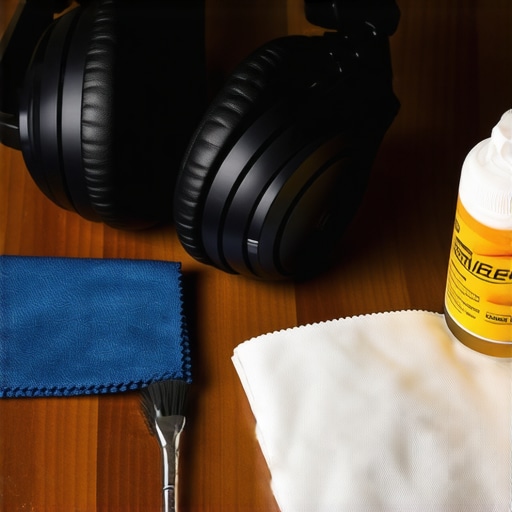
Maintenance is the part of the hobby that isn’t sexy, so most people skip it until something breaks. But think of your speakers and headphones like a high-performance engine; they need a tune-up. I keep a dedicated kit of 99% isopropyl alcohol, a soft-bristled brush, and a microfiber cloth right in my desk drawer. This prevents the build-up that leads to issues like how to stop your high-end headphones from creaking when you move, which is often caused by debris getting into the pivot points. If you are a vintage collector, you also need to be vigilant about moisture.
How do I maintain my high-end audio setup over time?
Maintaining your gear isn’t just about wiping off fingerprints; it is about the points of contact. I make it a habit to check my connections every six months. Learning how to clean green oxidization off your copper speaker terminals can restore the ‘punch’ you didn’t even realize you had lost. For your headphones, the pads are the first thing to go. I have seen way too many people ignore why your headphone pads are flaking and how to prevent it until they are literally covered in black specks every time they listen. A simple wipe-down with a damp (not wet!) cloth after a long session prevents skin oils from eating the synthetic leather. Also, do not overlook the small stuff; knowing how to clean dust out of your headphone jack without damaging pins is a five-minute fix that prevents those annoying ‘static’ noises when the cable jiggles. It is much better than buying a new cable because you thought the old one was frayed.
The Future of Sound is Smarter Not Just Louder
Moving forward, I am keeping a close eye on the rollout of Bluetooth LE Audio and the LC3 codec. This is the first time we are seeing a massive leap in wireless efficiency and latency reduction that might actually rival the 2.4GHz dongles I praised earlier. In the next few years, the gap between ‘wired’ and ‘wireless’ for competitive gaming might finally disappear entirely. We are also seeing AI-driven room correction software becoming more accessible, meaning your speakers will soon be able to calibrate themselves to your specific walls and furniture automatically. For now, focus on the physical health of your gear. My big challenge to you: download the Peace EQ interface today and load up the AutoEQ profile for your specific headset. It will feel like you just took a thick blanket off your speakers. Your ears—and your wallet—will thank you for the extra effort.
Why Throwing Money at Your Audio Setup Won’t Fix Your Lag
After years of testing everything from budget buds to thousand-dollar setups, I have realized that ‘gear acquisition syndrome’ is a real productivity killer. The biggest lightbulb moment for me was discovering that no amount of money can fix a bad signal chain. If your operating system is adding 50ms of delay, a $2,000 pair of headphones will still feel sluggish. Also, don’t rush the process; even if you find incredible home audio deals, you need to know how to properly break in new headphones without using white noise to ensure the drivers settle correctly before you start judging their speed. Latency is often cumulative—5ms here and 10ms there adds up to a missed headshot. Software is usually the villain, not the hardware. Your environment affects perception, too; I learned that how to fix the annoying echo in your minimalist home theater did more for my clarity than upgrading my DAC ever did.
The Three Tools I Use to Save My Sound Every Week
I do not just rely on expensive boxes; I rely on a specific workflow. Beyond the Peace EQ and AutoEQ mentioned earlier, I always keep a few diagnostic tricks up my sleeve. If I am setting up a desk or a small room, I prioritize spatial imaging by figuring out how to get better stereo separation in a very narrow room. I also keep a simple multimeter and a battery nearby—knowing how to use a 9v battery to check your speaker polarity is a life-saver when you are dealing with older or custom-wired setups where the ‘plus’ and ‘minus’ are not clearly marked. These are not flashy techniques, but they are what actually make the system sing.
Stop Chasing Specs and Start Hearing the Game
At the end of the day, your audio should be an invisible bridge between you and the digital world. It should not be something you struggle with or notice. Once you have ironed out the latency and cleaned up the signal paths, stop looking at the settings and just play. The best home audio deals are the ones that let you forget about the technology and lose yourself in the experience. Whether you are climbing the ranks in a shooter or watching a cinematic masterpiece, you now have the tools to ensure your sound is as fast as your reflexes. Have you ever found a weird software setting that was secretly adding lag to your setup? Let me know in the comments below!