
It was a chilly Tuesday morning, and I was just settling into my groove on the daily commute. My favorite playlist was pumping, the bass was hitting perfectly, and then—boop-boop. The dreaded low-battery chime. I checked my phone. I had only been listening for forty-five minutes. These were premium, expensive buds that used to easily carry me through an entire six-hour flight. Now, they were begging for mercy before I even reached my office desk. I felt completely cheated, and honestly, a little foolish. I realized right then that my daily audio companions were slowly losing their stamina, and I had no idea why.
The Real Reason Your Buds Are Dying So Fast
We have all been there. You buy a gorgeous new pair of wireless earbuds, and they feel like magic. But fast forward a year or two, and you are constantly hunting for your charging cable. The hard truth is that the tiny lithium-ion batteries sealed inside your earbuds have a very finite lifespan. Every single charge cycle degrades them just a little bit. Early on, I made a classic rookie mistake: I would leave my earbuds sitting in their case, plugged into a high-voltage wall charger on my desk all day and night. I did not realize that keeping these microscopic batteries at maximum voltage constantly is like keeping a balloon inflated to its absolute limit—eventually, it loses its stretch. It is a very similar issue to why you should never charge your portable speaker overnight, as constant trickle charging cooks the battery chemistry over time.
Is battery degradation in tiny earbuds actually inevitable?
Yes, to some degree, it is. Because these devices are so incredibly compact, their batteries are microscopic—often holding less than 10% of the capacity of a standard smartphone battery. According to leading battery research organization Battery University, lithium-based batteries experience permanent capacity loss that accelerates at higher temperatures and high states of charge. When you combine those tiny capacities with daily use, even minor degradation feels massive. If you are also experiencing charging issues where they refuse to top up at all, you might be dealing with worn-out contact points, which is why the reason your wireless earbuds wont charge in their case anymore often comes down to simple dirt or tarnished metal rather than a dead battery. Today, we are going to look at the exact habits that are secretly killing your earbud battery life and how you can stretch their daily playtime back to where it belongs. Have you noticed your own buds dying before your morning routine is even finished?
Stop the Slow Death of Your Earbud Battery
To actually keep your earbuds alive for years, you need to change how they live inside their charging case. Think of your earbud battery like a sprinter: it is designed to run hard and then rest, not stand on the starting line under maximum muscle tension forever. When you leave your case plugged into a high-wattage wall adapter 24/7, you keep the cells in a perpetual state of high-voltage stress. I learned this the hard way when I ruined a brand new pair of premium noise-canceling buds in under nine months by leaving them docked on my desk charger constantly. By the time I realized my mistake, they barely held thirty minutes of juice. You must break the cycle of constant charging if you want your gear to survive.
Ditch the Fast Chargers for Good
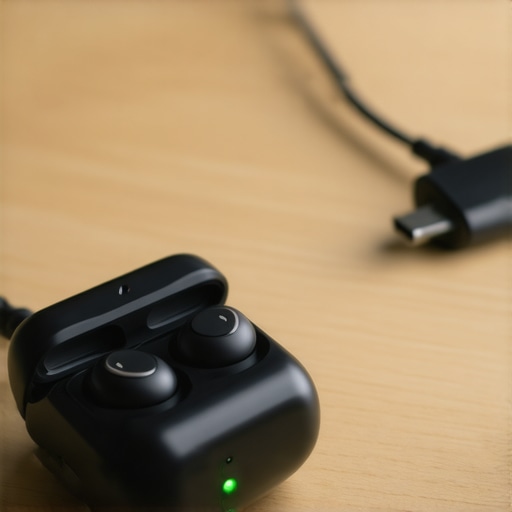
Your smartphone quick-charger is absolute poison for tiny earbud batteries. Those high-output bricks push too much current too fast, generating excess heat that degrades the microscopic lithium cells instantly. Instead, look for a low-amperage USB port on your computer or an older, standard 5-volt wall adapter. It is the same basic chemistry principle that explains why you should never charge your portable speaker overnight—excessive voltage and heat over prolonged periods will cook your battery chemistry. I switched my charging routine to a basic low-power USB hub, and my replacement set of buds still retains nearly its original battery capacity after a year of daily abuse.
Keep the Contacts Spotless to Avoid Trickle Draining
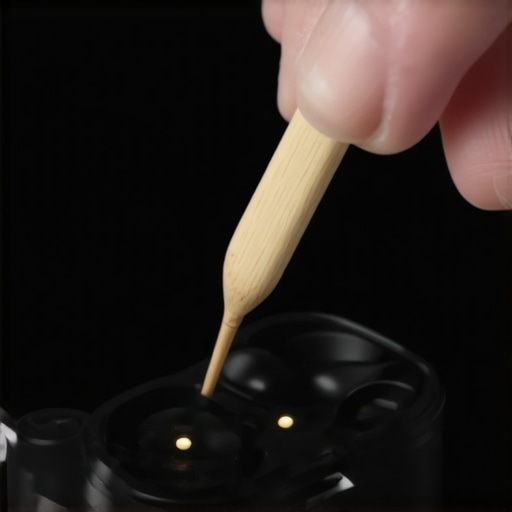
Sometimes your earbuds are not actually losing capacity; they are simply struggling to draw power. Tiny amounts of earwax, body oil, and dust collect on the gold-plated charging pins inside the case and on the buds themselves. This creates resistance, forcing the charging system to work harder, run hotter, and trickle-charge inefficiently. You can easily clean this buildup using a wooden toothpick and a drop of isopropyl alcohol. While you are keeping your audio gear clean, it is also highly beneficial to learn the easy way to clean earwax out of your earbud-mesh to restore lost volume and maintain sound balance. Once a month, I take two minutes to detail my charging connections, and it has completely eliminated those annoying instances where one earbud fails to charge at all.
Manage Your ANC and Ambient Sound Modes Safely
Active Noise Cancellation (ANC) and transparency modes are incredible features, but they require the internal microprocessors to work double-time, constantly analyzing external sounds and generating anti-noise. This processor load drains your tiny batteries at almost twice the speed of standard playback. If you are sitting in a quiet office or studying in a peaceful room, turn these features off. Running ANC in a silent environment is a massive waste of battery cycles and can sometimes introduce a faint background hiss, which is a classic symptom of the mistake that makes your noise canceling headphones hiss in quiet rooms. Save the heavy-duty noise cancellation for your noisy commutes or flights to preserve those precious charge cycles.
Prevent Winter Battery Freeze
Extreme cold is another silent killer of lithium-ion chemistry. When temperatures drop, the chemical reactions inside your earbud batteries slow down drastically, causing the voltage to drop rapidly and forcing the device to shut down prematurely. I used to leave my earbud case in my cold car overnight during winter, only to find them completely dead by morning. Always store your earbuds in an inside coat pocket close to your body heat when outdoors in freezing weather. Keeping them warm prevents the battery from plunging into deep discharge states that can permanently warp the internal cells.
While understanding how to charge your earbuds is a great start, there is a much deeper layer to audio battery health that most manufacturers do not advertise. We are conditioned to believe that as long as we buy premium gear, the internal components will handle the heavy lifting. However, relying blindly on automated charging cases often leads to premature hardware failure. Let us dig deeper into the actual chemistry and the sophisticated misconceptions that plague even the most seasoned audiophiles.
The Great Battery Calibration Myth
Everyone in the tech space tells you to occasionally drain your lithium-ion batteries to zero percent to calibrate them. In my experience, performing deep discharge cycles on microscopic earbud batteries is one of the quickest ways to permanently kill their capacity. While deep cycling was beneficial for old nickel-cadmium packs, modern lithium cells experience severe stress when they drop below twenty percent. When you drain them to absolute zero, you risk triggering an internal sleep mode in the battery protection circuit, rendering the bud permanently unresponsive. If you ever find yourself with a completely dead earbud that refuses to wake up, you might think the battery is fried, but often the reason your wireless earbuds wont charge in their case anymore is simply a tripped safety circuit or dirty contact pins that prevent the initial wake-up current from reaching the cell.
Why does trickle charging do more damage than fast charging?
According to research from the battery testing experts at Cadex Electronics, lithium-ion batteries do not tolerate overcharging or being held at high voltage states. While fast chargers cause damage via heat spikes, the real silent killer is the continuous trickle charging that occurs when earbuds sit at 100% in their case for days on end. This constant state of high voltage causes parasitic reactions in the electrolyte, coating the anode and permanently restricting lithium-ion flow. It is a subtle process of chemical wear that mirrors how why your bluetooth speaker is losing battery while turned off due to tiny standby currents. To mitigate this, some premium brands are introducing software limits that cap charging at 80% until you are ready to use them, but if your model lacks this smart feature, leaving them permanently docked is a dangerous trap.
The Temperature Trap You Are Ignoring
We often worry about freezing winter temperatures, but the heat generated by your own body is an overlooked threat. Earbuds sit directly inside your ear canal, absorbing body heat for hours at a time. When you combine body heat with the heat generated by active bluetooth chips and DACs, the internal battery easily exceeds 35°C (95°F). According to electrochemical studies, storing or operating a lithium battery at these elevated temperatures accelerates capacity loss exponentially. If you are also using third-party ear tips that seal the earbud too tightly, you might notice they fall out more often in extreme conditions, which is why why your wireless buds fall out more in the winter can sometimes be a blessing in disguise as it forces you to adjust them and let the drivers cool down. Have you ever fallen into this trap and noticed your buds getting physically warm? Let me know in the comments below.
I used to think that when my earbud batteries degraded, my only option was to throw them in the trash and buy a new pair. But after consulting with electronic repair specialists, I realized that taking control of your charging habits is only half the battle. You also need the right toolkit and a proactive maintenance mindset. Just like keeping your favorite vinyl setup clean, maintaining miniature electronic nodes requires a delicate touch and the correct tools.
How do I maintain my earbud battery health over time?
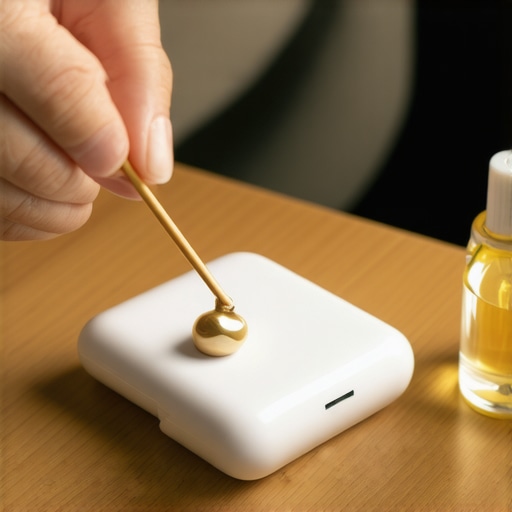
To keep your wireless earbuds operating at peak capacity for years, you must treat them like high-precision audio equipment. I personally keep a specialized maintenance kit on my desk. This consists of a small bottle of 99% isopropyl alcohol, some wooden toothpicks, a soft microfiber cloth, and a specialized conductive contact cleaner. Once a month, I carefully clean the metal charging plates. If you neglect this, you risk dealing with a dead connection, much like how the reason your wireless earbuds wont charge in their case anymore is almost always linked to poor contact hygiene rather than true hardware failure. Additionally, I use a physical USB power meter—a cheap tool that plugs between your charger and cable—to monitor exactly how many milliamps are pushing into my charging case, ensuring my brick isn’t secretly cooking the internal lithium cells with unregulated voltage.
Looking ahead, I predict we are going to see a massive shift in how these micro-batteries are manufactured and managed. Tech giants are already experimenting with solid-state micro-batteries that resist heat degradation far better than current lithium-ion chemistry. Until those arrive, software is our best defense. Many premium models are starting to implement “battery preservation modes” that learn your daily routine and pause charging at 80% capacity until just before you typically leave for your morning commute, keeping the cells at a lower stress level for as long as possible.
If you want to prolong the life of your audio gear right now, I highly encourage you to try one specific advanced tip tonight: ditch your fast-charging phone block completely. Find an old, low-power USB port on a computer, or dig up a legacy 5-volt, 1-amp charging plug from an old phone. Use only that slow charger for your earbud case for the next month. You will notice the case stays completely cool to the touch while charging, saving your microscopic batteries from the silent, heat-induced degradation that destroys their daily stamina.
Looking ahead, I predict we are going to see a massive shift in how these micro-batteries are manufactured and managed. Tech giants are already experimenting with solid-state micro-batteries that resist heat degradation far better than current lithium-ion chemistry. Until those arrive, software is our best defense. Many premium models are starting to implement “battery preservation modes” that learn your daily routine and pause charging at 80% capacity until just before you typically leave for your morning commute, keeping the cells at a lower stress level for as long as possible.
If you want to prolong the life of your audio gear right now, I highly encourage you to try one specific advanced tip tonight: ditch your fast-charging phone block completely. Find an old, low-power USB port on a computer, or dig up a legacy 5-volt, 1-amp charging plug from an old phone. Use only that slow charger for your earbud case for the next month. You will notice the case stays completely cool to the touch while charging, saving your microscopic batteries from the silent, heat-induced degradation that destroys their daily stamina.
The Hardest Lessons I Learned Burning Through Wireless Earbuds
Before I unlocked the secrets of proper battery care, I treated my earbud cases like indestructible power bricks. This careless approach cost me hundreds of dollars in premature replacements. Here are the most valuable realizations that completely changed how I handle my portable audio gear:
- The charging case is a live environment, not just a storage box. Constantly keeping your earbuds docked at 100% capacity inside a plugged-in case is the battery equivalent of redlining a car engine while idling. Use your case as a battery bank only when you actually need a top-up.
- Heat is a far quicker killer than physical wear. We often baby our gear to avoid scratches, yet we routinely cook the internal lithium chemistry by leaving charging cases on sunny window sills, hot car dashboards, or next to warm laptops.
- Clean contacts prevent phantom drain. Many times I thought my batteries were shot, but the charger was simply getting confused by microscopic debris. If your case is working overtime trying to establish a connection, it degrades both the case and the buds. Knowing the reason your wireless earbuds wont charge in their case anymore is usually just a matter of cleaning the metal plates can save you from throwing away perfectly good hardware.
My Essential Toolkit for Micro-Battery Maintenance
You do not need expensive diagnostic equipment to keep your wireless earbuds operating at peak performance. These are the exact, low-cost tools I use once a month to double the lifespan of my personal audio collection:
- 99% Isopropyl Alcohol & Wooden Toothpicks: Essential for removing skin oils and earwax from the charging pins without corroding the delicate gold plating.
- A Legacy 5V/1A USB Power Block: The ultimate defense against high-voltage heat damage. Modern fast chargers push too much current, whereas these older slow-chargers keep your case completely cool.
- A Protective Silicone Case Cover: Not just for drops! A thick silicone cover provides an extra layer of insulation against extreme ambient temperatures, which helps prevent winter battery freeze when you are commuting in cold weather.
Keep Your Audio Gear Alive for Years
Taking control of your charging habits is the single most effective way to ensure you actually get your money’s worth out of your premium audio investments. Microscopic batteries require a bit of mindful care, but the payoff is hundreds of extra hours of pure, uninterrupted music. Start by ditching that fast charger tonight, keep those charging pins spotless, and enjoy the peace of mind that comes with gear that actually lasts. Your favorite playlists deserve to be heard without the constant threat of a low-battery chime.
Have you ever had a premium pair of wireless earbuds die on you way too early in their lifespan? Let me know how long your current set lasts in the comments below!