
I remember sitting in my favorite leather chair, staring at a pair of high-end towers that cost more than my first car, and feeling… disappointed. They sounded boomy. The vocals felt buried. I felt cheated by the reviews. I even tried to properly break in my gear for a hundred hours, thinking it was a mechanical issue. It wasn’t. It was the room. My walls were lying to my ears, and no amount of expensive copper wire was going to fix it. Today, I’m going to show you how that device in your pocket can reveal the hidden acoustic traps in your home. We are going to stop the guessing game and finally get the clarity you paid for.
Your Room is Sabotaging Your Expensive Speakers
Most of us blame the hardware when things sound off. We think we need a new external DAC or more wattage to fix a “thin” sound. But here is the cold, hard reality: your walls, ceiling, and floor are EQing your music without your permission. Research from the Acoustical Society of America suggests that at low frequencies, the room environment can influence the sound by as much as 10 to 15 decibels, creating massive peaks and dips that ruin accuracy. I spent years moving my furniture around like a madman, often making the mistake of thinking pushing my speakers against the wall would help the bass, when it actually just made the muddiness worse. By using your phone to visualize the frequency response, you can see exactly where the sound is bunching up. Have you ever felt like your setup sounds amazing in one chair but completely flat two feet to the left?
Can a Smartphone Mic Actually Compete with Pro Gear?
You might be skeptical. After all, an iPhone mic is designed for phone calls, not for high-fidelity analysis. However, for identifying the “big picture” problems like standing waves or annoying echoes in a minimalist home theater, modern smartphones are surprisingly capable up to about 8kHz. While it won’t replace a $500 calibrated Earthworks microphone for professional studio tuning, it is more than enough to help you find the sweet spot in a rectangular room. I used to think I needed a degree in physics to understand a waterfall graph, but once I saw my first real-time analyzer (RTA) plot on my screen, everything clicked. It turns out my “warm” sound was actually just a massive 120Hz hump caused by my desk. When you move your speakers off the desk and onto stands, the phone will show you that change instantly. Let’s look at how to set up the software so you can finally see what you’ve been hearing.First, grab a Real-Time Analyzer (RTA) app—’Spectroid’ for Android or ‘Octave’ for iOS are great starting points. These apps don’t need to be lab-grade to show you where your room is fighting you. To start, play a ‘pink noise’ track through your speakers. If you have ever wondered why your speakers sound harsh when you play high-res files, your phone’s screen will likely reveal a jagged spike in the treble that’s actually a reflection off your glass coffee table.
Turn Your Phone Into a Professional Acoustic Sensor
You aren’t just taking one measurement and calling it a day. The trick is the ‘moving mic’ method. While the pink noise is playing, hold your phone at arm’s length and slowly move it in a figure-eight pattern around your primary seating position. This prevents a single ‘null’ from tricking you into over-correcting a problem that only exists in a three-inch wide spot. I once wasted two hours trying to figure out how to get clear movie dialogue without a dedicated center speaker, only to realize my phone was showing a massive dip at 1kHz because of where I was standing. Once I used the figure-eight movement, the true room response became clear. 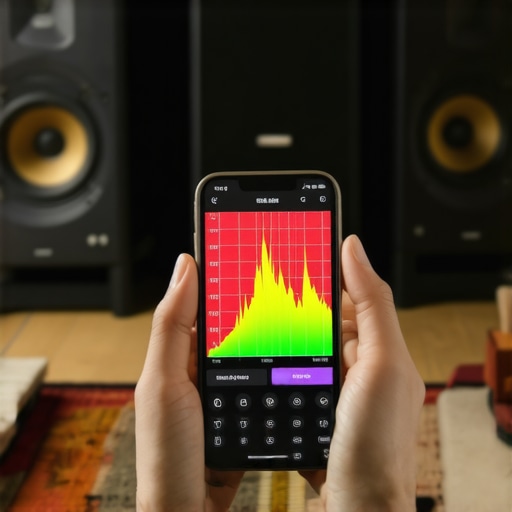
Measure Your Room Without Looking Like a Statue
I remember a specific time I was helping a friend tune his man-cave. He had spent thousands on subwoofers, yet the room felt hollow and weak. We ran the RTA, and the graph showed a flatline in the sub-bass region at the couch. It turned out he was sitting in a ‘bass black hole.’ We used the phone to find the high-energy zones and discovered that how to find the sweet spot for your speakers in a rectangular room was actually three feet to the left of his original couch placement. We moved the furniture, and the room finally ‘loaded’ properly, transforming the sound from thin to cinematic.
Read the Graph to Flatten Your Sound Stage
Look for the big peaks first. If you see a massive mountain at 80Hz, that is the ‘boom’ you’ve been hearing that muddies up the vocals. This is often why your speakers’ bass port should never be pushed against a wall; those ports use the wall as a megaphone for the wrong frequencies. If the RTA shows that low-end hump, pull the speakers out six inches at a time. Watch the screen. You’ll see that mountain start to crumble into a manageable hill. If your desk is the culprit, you’ll see why your bookshelf speakers sound better when you move them off the desk as those mid-bass reflections disappear.
Small Tweaks that Stop Your Furniture from Singing
Sometimes the graph won’t just show speaker issues; it will show mechanical vibration. I’ve seen RTA graphs jump every time the bass hit because the floor was vibrating the equipment rack. Learning how to fix a subwoofer that is vibrating your furniture or realizing the reason your speaker stands need to be filled with sand becomes obvious when you see the ‘aftershock’ on your phone’s display. Even in tricky layouts, like finding the secret to mounting surround speakers in a room with no back wall, the phone acts as your navigator through the acoustic chaos, telling you exactly where the sound is bunching up or dying out.While an RTA app gives you a visual map of your room, the biggest mistake I see enthusiasts make is chasing a perfectly flat line on the screen while ignoring the physical reality of their gear. We have been conditioned to believe that ‘more’ is always better—more bits, more kilohertz, and more wattage. But in my experience, chasing these specs without context often leads to a fatiguing listening experience. For example, the industry loves to sell us on ultra-high-sample-rate files, yet there is a dirty secret: many tweeters and DACs struggle with ultrasonic noise. This is often why your speakers sound harsh when you play high-res files; you aren’t hearing more music, you are hearing your equipment struggle with frequencies it was never meant to reproduce.
High-Res Audio Might Be Ruining Your Experience
A common myth is that high-resolution audio is a universal upgrade. However, unless your entire chain—from the source to the crossover—is optimized for it, you might be inducing intermodulation distortion. I’ve seen setups where switching back to standard 16-bit/44.1kHz actually improved the clarity because the amplifier wasn’t being pushed into a high-frequency frenzy. If you feel like your high-end system is ‘shouting’ at you, try stepping down the resolution. You might find that [how to tell if your amplifier has enough headroom for your speakers](https://premiumsounddeals.com/how-to-tell-if-your-amplifier-has-enough-headroom-for-your-speakers) is more about quality of power than the quantity of data you’re feeding it.
Does More Wattage Actually Equal Better Sound Quality?
It’s the oldest trap in the book. We assume a 200-watt amp sounds ‘bigger’ than a 50-watt amp. But unless you are driving notoriously inefficient towers in a massive hall, you are likely only using the first five watts. The danger isn’t having too little power; it’s having ‘dirty’ power. I’ve heard [why your expensive headphones sound thin on a basic smartphone](https://premiumsounddeals.com/why-your-expensive-headphones-sound-thin-on-a-basic-smartphone) and it’s rarely about the volume—it’s about the voltage swing and output impedance. High wattage is a marketing metric; current delivery is the engineering reality. 
The Subtle Seal Breach That Kills Your Bass
If you are a headphone listener, there is an ‘oops’ factor that almost everyone ignores: the acoustic seal. You can spend $3,000 on flagship planar magnetic headphones, but if you wear glasses with thick temples, you’ve already lost the battle. Research published by the Audio Engineering Society (AES) demonstrates that even a 2mm gap in a headphone cushion can cause a massive drop—up to 20dB—in frequencies below 100Hz. This is exactly [why your headphones sound thin when you wear glasses](https://premiumsounddeals.com/why-your-headphones-sound-thin-when-you-wear-glasses). I spent weeks EQing my favorite pair before realizing my frames were the culprit.
XLR Cables Won’t Save a Bad Power Supply
Another nuance that gets lost in the ‘audiophile’ sauce is the obsession with balanced connections. While [the real performance benefit of using balanced XLR cables](https://premiumsounddeals.com/the-real-performance-benefit-of-using-balanced-xlr-cables) is massive in a recording studio with 100-foot cable runs, it won’t fix the hum coming from a poorly grounded outlet in your living room. Before you buy expensive interconnects, look at your power management. I once saw a guy spend five hundred dollars on silver cables to fix a hiss, only to realize it was a $10 LED dimmer switch on the same circuit causing the interference. Have you ever fallen into this trap of buying gear to fix a problem that wasn’t actually a gear problem? Let me know in the comments.
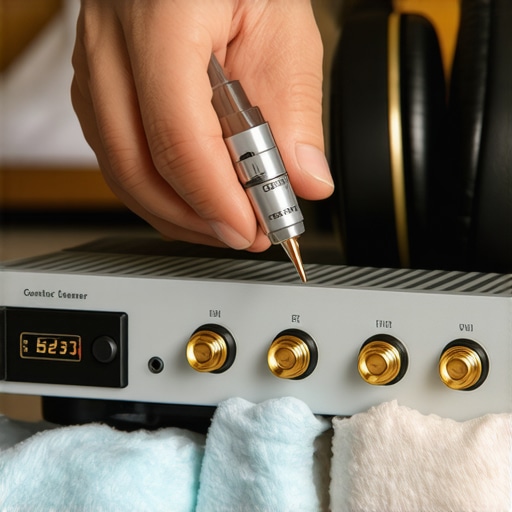
Once you have tuned the room and dialed in your speaker placement, the battle shifts from acoustics to entropy. I have seen five-figure systems sound like budget gear because of a microscopic layer of dust on a capacitor or a bit of corrosion on a terminal. If you hear a pop when you adjust the volume, do not panic and start shopping for a new integrated amp. Learning how to fix a scratchy volume dial with electrical contact cleaner is the first skill every enthusiast should master. I personally swear by technical-grade cleaners like DeoxIT D5; as Caig Laboratories notes in their technical documentation, these solutions don’t just clean—they displace oxygen and leave a protective seal on the metal. This isn’t just about ‘cleaning’; it is about restoring the electrical path to the original factory specification. If you live in a humid climate, you should also check your wires periodically. You will eventually need to know how to clean green oxidization off your copper speaker terminals because that ‘green fuzz’ is literally eating your signal and increasing resistance.
Don’t Let Your Headphones Flake Away
If you are primarily a headphone listener, maintenance is much more tactile. Those soft protein leather pads feel amazing on day one, but human skin oils are surprisingly acidic. I have had flagship pairs turn into a crumbly, peeling mess in less than two years because I didn’t take thirty seconds to wipe them down after a long session. Understanding why your headphone pads are flaking and how to prevent it can save you hundreds in replacement parts over the life of the gear. I also keep a small container of dry PTFE lubricant for my headband hinges. There is nothing more distracting than a ‘luxury’ pair of headphones that squeak every time you tilt your head, so learning how to stop your high-end headphones from creaking when you move is a tiny tweak with a massive psychological payoff for your listening focus.
How do I protect my audio investment for decades?
The biggest long-term threat to your speakers isn’t high volume—it is chemical aging. Capacitors have a finite shelf life, often drifting after 20 to 30 years of heat cycles. This is why your vintage speakers are losing their punch over time; the crossover components are no longer dividing frequencies accurately. If the bass feels loose or the imaging seems ‘smeared’ compared to when you first bought them, you need to know how to tell if your speakers’ capacitor is starting to fail. Looking ahead, I predict we are entering the era of ‘Self-Healing Audio.’ We are already seeing advanced DSP that can monitor the back-EMF of a driver to detect aging, essentially using software to mask the mechanical wear of an aging cone. The Advanced Tip: Grab a bottle of specialized contact cleaner today and treat every connection point in your chain, from the wall plug to the speaker binding posts. You will likely find a ‘free’ 2dB of dynamic range just by lowering the noise floor through clean metal-to-metal contact.
The Hardest Lessons I Learned While Chasing Sonic Perfection
After years of obsessing over frequency response curves, I have realized that data is only half the battle. The most expensive gear in the world cannot overcome a room that is actively fighting it. One of the most humbling moments in my journey was discovering that my ‘audiophile-grade’ setup sounded worse than a budget system because of simple placement errors. For example, knowing why your speakers’ bass port should never be pushed against a wall is far more valuable than a $500 cable upgrade. Symmetry is another silent killer; if your left speaker is in a corner and your right is in the open, you will constantly wonder why your headphones sound slightly different in each ear or why your stereo image feels skewed to one side. Perfection is a moving target, but once you stop fighting your room and start working with it, the music finally begins to breathe.
My Essential Toolkit for Taming Wild Acoustics
If you are ready to move beyond the basic smartphone apps we discussed, here are the resources I personally use to keep my system in peak condition. First, I always keep a dedicated measurement device on hand, but you can actually start by learning how to use an old phone as a dedicated high-res music player and analyzer to keep your primary phone free. Second, always verify your power needs; knowing how to tell if your amplifier has enough headroom for your speakers is critical before you start boosting frequencies in your RTA app, as digital EQ can quickly eat up your amp’s power. Finally, I recommend the book ‘Sound Reproduction’ by Floyd Toole—it is the ‘bible’ of acoustic science and will explain the physics behind every dip you see on your smartphone screen.
Your Music Deserves to Be Heard Clearly
At the end of the day, all the graphs and measurements serve a single purpose: to remove the barriers between you and the artist’s intent. You have already taken the most important step by acknowledging that your environment matters. Whether you are troubleshooting how to properly break in new headphones without using white noise or repositioning a thousand-dollar subwoofer, the goal is the same—uninterrupted emotional connection to the sound. Don’t be afraid to experiment with ‘wrong’ placements if they sound right to your ears, but use your phone as a guide to ensure you aren’t masking detail with boomy reflections. Your journey toward better audio doesn’t end with a purchase; it begins with the curiosity to tweak, measure, and listen. Did your RTA app reveal any surprising peaks or dips in your favorite listening spot? Let me know your results in the comments below!