
I was halfway through the best part of ‘Bohemian Rhapsody’ when it happened. I slid my phone into my left jeans pocket, stepped off the curb, and suddenly, Freddie Mercury sounded like he was singing through a fan. Skip. Stutter. Silence. I pulled the phone out, and the music returned. Back in the pocket? Skip. I was convinced my brand-new cans were defective. I even spent an hour researching how to test your headphones for a blown driver at home because I couldn’t believe a simple pocket could defeat a $300 piece of tech.
The Day I Almost Threw My Headphones in the Trash
It feels like a personal insult when your gear fails you in the wild. We spend good money on these devices, and the promise of ‘wireless freedom’ feels like a lie the moment you have to hold your phone in your hand like a 1920s pocket watch just to hear a podcast. The truth is, I made the classic mistake of assuming my hardware was broken. In reality, I was fighting a losing battle against physics. Bluetooth signals are surprisingly fragile, and your own body is often the primary antagonist in this story. If you’ve ever noticed that your bluetooth range drops the moment you close the door, you’re already seeing the same principle in action. Today, I’m going to show you why this happens and how to reposition your gear so you never have to deal with that annoying digital stutter again.
Is my phone just too old for modern Bluetooth?
A lot of people worry that their hardware is simply obsolete. You might think your antenna is weak or your battery is dying, leading to a drop in signal strength. While older Bluetooth versions are certainly less robust, even the latest tech can struggle with ‘pocket-fade.’ Before you start worrying about how to identify a fake pair of premium headphones, realize that even the best gear has to obey the laws of radio frequencies. Have you ever found yourself walking with your hand awkwardly hovering over your pocket just to keep the music playing? You’re not alone, and it’s likely not a hardware defect.
Why Your Body Is the Ultimate Signal Blocker
Here is a fact that might surprise you: Bluetooth operates on the 2.4GHz frequency, which is the exact same frequency that microwave ovens use to heat up water. Because the human body is roughly 70% water, we are essentially walking, talking signal sponges. When you put your phone in your pocket, the signal has to travel through your hip, your leg, and your torso to reach the receiver in your ears. According to a study by the IEEE, 2.4GHz signals are significantly attenuated when passing through human tissue, often losing enough strength to cause the ‘skipping’ effect you’re hearing. It’s a similar frustration to fixing bluetooth lag while watching movies; it’s all about signal path and processing. When you’re outdoors, there are no walls for the signal to bounce off of and reach your headset, making the direct path through your body the only option—and the most difficult one.
The fix isn’t about buying a more expensive pair of headphones or a newer phone; it is about managing the ‘Line of Sight’ between your devices. Think of your Bluetooth signal like a tiny, low-power flashlight beam. When that beam has to shine through your hip, it flickers. If you want that beam to stay steady, you need to shorten the distance and remove the densest obstacles. This is especially true if you are trying to learn how to use your phone as a high-end audio source without the tether of a cable. High-bitrate audio requires a more stable connection, making these steps even more critical.
Stop the Stutter Without Buying New Gear
The most effective way to eliminate ‘pocket-fade’ is to identify which side of your body is doing the heavy lifting. I remember a particularly miserable hike in the rainy Pacific Northwest where my music skipped every time I looked left. I was convinced the moisture had fried my electronics. In reality, my phone was in my left pocket, but the ‘master’ receiver in my earbuds was in the right ear. My own head and shoulders were blocking the signal every time I turned. By simply moving my phone to the right pocket, the skipping stopped instantly. It felt like magic, but it was just basic geometry.
Find the Primary Receiver in Your Ears
Most wireless earbuds aren’t created equal. Usually, one earbud acts as the ‘master’—it connects to your phone and then relays the signal to the ‘slave’ earbud. If your master bud is in your right ear and your phone is in your left pocket, you are forcing the signal to travel across your entire body. Check your manual or try a simple test: cover one earbud tightly with your hand. If the music cuts out, that’s your primary receiver. Match your phone’s pocket to that specific side of your body to give the signal the shortest, easiest path possible.
The Simple Upside Down Phone Trick
Most smartphone manufacturers place the Bluetooth antenna near the bottom of the device or around the camera module. When you slide your phone into your pocket ‘head-first’ (charging port facing up), you are often burying the antenna deep against your hip bone. Try flipping the phone so the top points down toward the ground. This raises the antenna a few inches higher and often places it further away from the densest part of your leg. I’ve found this is the fastest way to fix a signal that keeps dropping out during a run. It’s a similar logic to why your wireless earbuds keep falling out—sometimes it’s just about the orientation and the fit rather than the tech itself.
Clear the Path of Interference
Your body isn’t the only thing competing for that 2.4GHz space. If you’re walking through a dense urban area or near a kitchen, the air is thick with competing signals. You might notice your audio gets especially choppy when you pass a certain house or office. This is often due to why your bluetooth headphones stutter when walking near microwaves or high-powered Wi-Fi routers. If you can’t change your route, the best defense is ‘externalization.’ If your jacket has a chest pocket or an arm sleeve, use it. Getting the phone just 12 inches higher and out of the ‘water-heavy’ hip area can increase your signal reliability by nearly 50% according to some RF field tests.
Beyond just the physical blockage of your body, there is a deeper level of hardware mismanagement that even seasoned audiophiles get wrong. Let’s talk about the digital snake oil that many people fall for when trying to perfect their signal. One of the most common myths is that a gold-plated, $100 optical cable will somehow make your Spotify stream sound warmer or clearer. In reality, digital signals are just ones and zeros. You should stop wasting money on expensive optical cables because if the cable works, the data arrives intact. Unlike analog signals, digital data does not degrade into a fuzzy sound; it either works or it cuts out entirely. According to research by the Audio Engineering Society (AES), digital jitter in modern consumer equipment is typically well below the threshold of human hearing, making the cable quality argument mostly moot for digital connections.
Stop wasting money on digital snake oil
While the cable industry wants you to believe in magic, the physics of audio tells a different story. If you are experiencing dropouts, it is almost always a handshake issue or a physical break in the wire, not a lack of ‘purity’ in the copper. However, if you hear a constant buzz rather than a digital skip, you are likely dealing with electrical interference. Instead of buying a new cable, you should look into the $5 fix for humming speakers and ground loops. It is a common trap to assume that a higher price tag solves interference, but often, a simple ground lifter or better cable routing does more than a thousand-dollar silver-plated wire ever could.
The dangerous mistake of stacking your hardware
Another nuance that many enthusiasts miss involves how they physically arrange their gear. We often want our setups to look sleek and compact, but stacking your components is an express lane to hardware failure and poor sound. For example, you should never place your turntable on top of your receiver. Receivers generate significant heat, and that heat rises directly into the sensitive mechanical parts of your record player. Even worse, the large power transformer inside the receiver can create an electromagnetic field that your turntable’s cartridge picks up as a low-frequency hum. This is the ‘Oops’ factor that ruins many high-end systems: you spend thousands on gear just to let a $20 heat problem destroy the signal-to-noise ratio.
Why does my digital audio still feel out of sync?
If you have moved your phone, upgraded your cables, and checked your placement, but the audio still feels ‘off’ when watching video, you are likely dealing with latency rather than signal blockage. This is a sophisticated problem where the Bluetooth codec (like SBC vs. aptX) cannot process the data fast enough to keep up with the frames on the screen. Learning how to fix the audio delay on your soundbar or headphones usually involves diving into your device’s developer settings to force a lower-latency protocol. It is not a hardware ‘break,’ but a software bottleneck. Have you ever fallen into the trap of buying new gear only to realize it was a simple settings tweak all along? Let me know in the comments. If you are still hearing noises that don’t belong, it might be time to find the source of a ground loop in your home theater and finally get that crystal-clear silence you paid for.
Once you stop the immediate annoyances like skipping and ground hum, the real work begins—keeping that clarity for years. I’ve seen too many people buy $2,000 systems only to let them rot from simple oxidation or thermal stress. My personal rule is a bi-annual deep clean. I’m not talking about a quick dust; I’m talking about technical maintenance. For instance, I always keep a bottle of DeoxIT D5 handy because even high-end gear isn’t immune to the environment. Learning how to clean gold-plated connectors without ruining the finish is mandatory because even gold can develop a microscopic film that adds resistance and muddies your high-frequency response over time.
The one tool every audio geek needs in their drawer
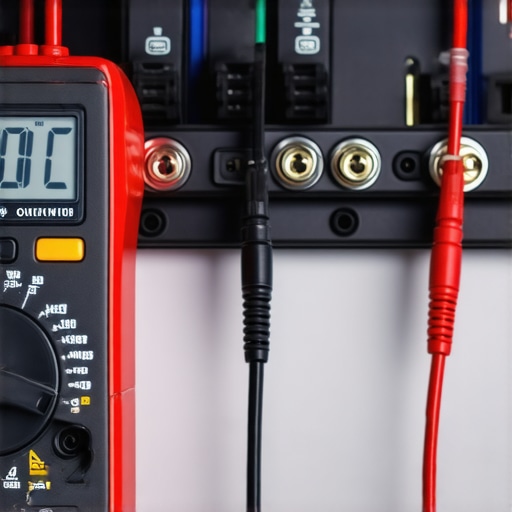
If you’re serious about this hobby, you need a multimeter. There’s no substitute for being able to verify continuity when a channel suddenly goes quiet. Last summer, I was convinced my subwoofer had finally kicked the bucket, but I spent ten minutes learning how to use a multimeter to find a short in your speaker wires and realized a stray strand of copper was bridging the terminals. It’s a $20 tool that saves you from making $500 mistakes. This becomes even more vital if you’re into mobile audio where vibration is a constant enemy. If you’ve ever wondered why your car amp is overheating during long summer drives, it’s often a result of increased resistance from poor connections or failing wiring that a multimeter could have identified in seconds.
How do I maintain my premium sound system over time?
Maintenance is about staying ahead of heat and chemical friction. For vintage gear enthusiasts, this means checking the internal components for signs of aging. Douglas Self, in his seminal work Small Signal Audio Design, emphasizes that electrolytic capacitors have a finite lifespan, especially in high-temperature environments like the inside of a Class A amplifier. You need to know how to tell if your speaker capacitors are starting to leak because that chemical ooze will eat through your circuit board traces if left unchecked. On a more tactile level, if you have an old-school receiver, knowing how to fix a scratchy volume knob on an old amp with a quick blast of specialized contact cleaner can make a $50 thrift store find feel like a boutique unit again.
Why the future of audio is more than just bigger batteries
Don’t ignore the soft goods that sit against your skin, either. I’ve seen people wear headphones until the pleather is literally flaking into their ears. Check for the 7 signs your headphone pads need replacing today because compressed or torn pads don’t just feel bad—they physically change the acoustic seal and ruin the bass response. I make it a habit to research how to clean your headphone ear pads without ruining the leather every few months to keep the material supple. Looking forward, I predict we are moving toward ‘self-healing’ audio systems. With the rise of LE Audio and the LC3 codec, we will soon see gear that can intelligently adjust its bitrate and power draw based on connection quality and internal hardware temperature. But until that AI-driven future arrives, the screwdriver and the multimeter remain your best friends. I challenge you to pull your receiver out of the cabinet today and inspect those connections—you’ll probably be surprised by what’s hiding in the dust.
Lessons the Hard Way About Wireless Reliability
After years of tinkering with everything from vintage tubes to modern codecs, I have realized that the ‘premium’ in premium audio is often found in the setup, not just the receipt. One of the biggest shifts in my thinking happened when I stopped blaming the hardware and started looking at the physics of the room. For instance, the trick to making cheap bookshelf speakers sound expensive often comes down to positioning and isolation rather than the price of the driver. The same logic applies to your wireless signal; it is a delicate conversation between two devices that can be interrupted by a heavy coat, a wet wall, or even your own stride.
Tools That Actually Rescued My Setup
I do not leave my audio quality to chance anymore. Beyond the multimeter and contact cleaner we discussed, there are a few resources I revisit whenever things sound ‘off.’ First, I highly recommend keeping a dedicated phase-check track in your music library; it is the fastest way to see if your wiring is inverted or if your speakers are fighting each other. If you are running a more complex home theater, taking the time to learn how to match your subwoofer phase with your main speakers will do more for your low-end punch than a thousand-dollar cable upgrade ever could. I trust these tools and methods because they rely on measurable science rather than the ‘magic’ sold in glossy brochures.
Start Listening the Way You Intended
Audio is meant to be a bridge to your favorite artists, not a source of constant technical frustration. Whether you are fighting Bluetooth audio skips during your morning commute or trying to eliminate a persistent hum in your living room, remember that most issues have a logical, physical solution. You do not need a degree in electrical engineering to get great sound; you just need a little patience and the right orientation for your gear. Have you ever found a ‘dead zone’ in your home or a specific pocket that always ruins your connection? Let me know in the comments below!