
I was midway through the best part of a classic rock anthem at our neighborhood BBQ last weekend when the music just… stopped. My rugged little portable speaker, the one I used to brag about for its marathon battery life, had given up the ghost after barely ninety minutes of play. I stood there with a burger flipper in one hand and a silent hunk of plastic in the other, feeling like a complete rookie. It’s incredibly frustrating, isn’t it? You buy these gadgets for the freedom they provide, but suddenly you find yourself tethered to a wall outlet like it’s 1995 again. If you’re noticing your playback time shrinking faster than a cheap wool sweater, I’ve got some good news: you’re probably not crazy, and it’s likely not time to throw the unit in the bin just yet. Today, I’m going to walk you through exactly why your juice is vanishing and how we can stop the battery drain before your next outing.
Your Speaker Isn’t Lazy It Is Just Tired
We often treat our portable audio gear like it’s indestructible, but the lithium-ion hearts inside them are actually quite sensitive to how we treat them. I’ll be the first to admit I made a massive mistake early on: I used to leave my speaker plugged into a high-output laptop power brick twenty-four-seven, thinking I was keeping it “ready.” In reality, I was slowly cooking the internal cells. I’ve since learned that the truth about using a fast-charger for your portable speaker is a lot more complicated than simply assuming more power equals a better charge. When you force too much current or keep the voltage at a maximum for weeks on end, the chemistry inside the battery begins to degrade, leading to that annoying situation where 100% charge suddenly feels like 20%.
Is this just planned obsolescence or can I actually fix it?
It’s easy to feel cynical and assume the manufacturer just wants you to buy the newest model as soon as the warranty expires. While batteries do have a finite lifespan, most of the “sudden” death symptoms we see are actually due to heat, poor cycling habits, or even physical hardware failures that are surprisingly easy to address. For instance, if you find yourself wiggling the cable just to get a red charging light, you might actually need to learn how to fix a loose usb charging port on a bluetooth speaker rather than blaming the battery cells themselves. The “why” behind this matters because your speaker is an investment in your downtime. Whether you’re trying to find out why your portable speaker sounds better when placed in a corner or you’re just trying to survive a full day at the beach, the battery is the ultimate bottleneck. Did you know that according to experts at Battery University, exposing a fully charged lithium-ion battery to high temperatures is the quickest way to permanent capacity loss? It’s a scientific fact that heat is the silent killer of all things cordless. I want to hear from you—have you noticed your favorite Bluetooth speaker dying right when the party is finally getting started? It’s a common headache, but before you go shopping for an expensive replacement, let’s look at the hidden drains and maintenance habits you might be overlooking that are killing your runtime.
Clean the Port Before You Give Up
I once spent nearly an hour troubleshooting a speaker that refused to stay powered for more than ten minutes. I was convinced the lithium cells had simply reached the end of their life cycle. It turned out to be a tiny, compacted ball of denim lint from my jeans pocket wedged into the corner of the USB-C port. This debris prevented the charging pins from seating fully, meaning it was only receiving a “trickle” of power while I assumed it was fast-charging. Before you consider a replacement, grab a non-conductive wooden toothpick and see what’s living inside that port. While it’s a different connection, the cleaning principles are very similar to when you need to how to clean dust out of your headphone jack without damaging pins; a gentle hand and a bright flashlight are your best friends. Often, what looks like a “broken” port is just a dirty one.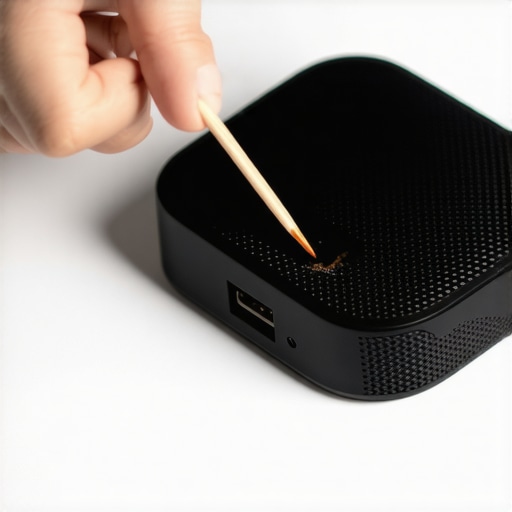
Teach Your Speaker How to Count Again
Sometimes the hardware is perfectly healthy, but the “brain” of the speaker is hallucinating. Most modern portable audio gear uses a battery management system (BMS) that acts like a fuel gauge. If you’ve been doing dozens of short, fifteen-minute charging bursts, the BMS can lose its calibration, resulting in a speaker that says 100% but shuts off ten minutes later. To fix this, you need to perform a full cycle. Let the speaker play until it dies completely—I mean until it won’t even show a status light. Then, plug it in and let it reach a full 100% without unplugging it once. This “re-indexes” the capacity and often restores hours of missing playback time.
Why Redlining the Volume is a Battery Killer
We all want to be the life of the party, but cranking the dial to the absolute maximum is like driving your car at redline RPMs—it’s wildly inefficient. When you push the internal amplifier to its limits, it consumes power exponentially faster because it is struggling to maintain signal integrity. This is also often why your bluetooth speaker sounds distorted at 80% volume. The amp is clipping, and that wasted energy is converted into heat rather than sound waves. If you find your battery tanking, try dropping the volume to 60% and moving the speaker into a corner; you’ll get more perceived bass and much longer runtime without working the internal hardware so hard.
Listen for Energy Leaks and Mechanical Drag
If your speaker is vibrating internally or making a strange how to fix a buzzing sound in your portable speaker at high volumes, that mechanical resistance is actually drawing more current from the battery. Think of it like a desk fan with a stuck blade; the motor has to work twice as hard just to spin. Tightening loose screws or fixing a rattling grill can surprisingly improve your efficiency because the driver isn’t fighting against its own chassis. Finally, keep the unit out of direct sunlight. Much like how to fix a car amplifier that keeps shutting off in summer, your portable gear will throttle its performance to prevent a thermal event. Heat increases internal resistance in the battery cells, which makes the energy transfer less efficient and drains your juice significantly faster just to maintain the same output level.
Beyond the environment, there is a fundamental misunderstanding about how “smart” chargers interact with your gear. Many people assume that as long as the charging light turns off, the battery is safe. However, maintaining a lithium-ion cell at a 100% state-of-charge for weeks on end is a recipe for chemical stress. Research from battery experts like Jeff Dahn at Dalhousie University has shown that high voltage levels at full charge accelerate the degradation of the electrolyte. This is why your speaker might hold a charge fine for the first six months and then suddenly lose half its capacity; it is not a manufacturer defect, but a result of constant high-voltage pressure on the internal chemistry.
The 100% Charge Trap You Need to Avoid
I have seen enthusiasts obsess over “breaking in” their gear, but they often focus on the wrong components. Much like how to properly break in new headphones without using white noise, battery health is about gentle cycles, not extreme stress. The biggest “oops” factor I see today is using high-wattage USB-PD laptop chargers on budget Bluetooth speakers. Even if the handshake “works,” the internal voltage regulators often run red-hot trying to step down that power. If your speaker is warm to the touch even after it is fully charged, you are essentially slow-cooking the battery. This thermal stress is very similar to the real reason your amp is getting hot to the touch; inefficiency always manifests as heat, and heat is the silent killer of longevity.
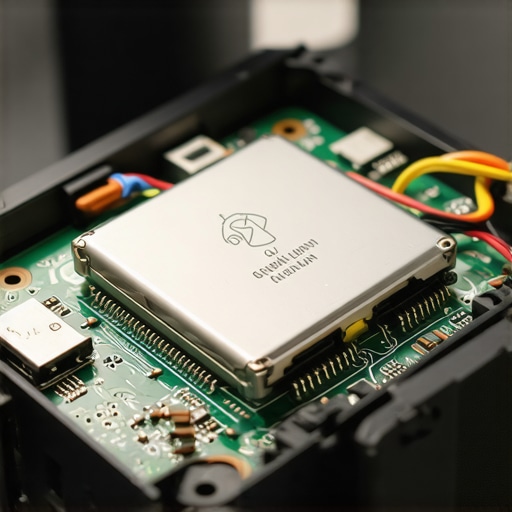
Is your speaker’s amplifier actually starving for current?
There is a technical nuance here that most people miss: as a battery ages, its internal resistance increases. This means even if the display shows “full,” the battery cannot dump current fast enough when a heavy bass hit occurs. This is remarkably similar to why your expensive headphones sound thin on a basic smartphone. The power source simply lacks the “oomph” to drive the hardware. If your speaker sounds clear at low volume but clips or shuts off when you crank it, don’t just blame the software. You might be seeing the early signs of a high-resistance cell. I’ve fallen into the “it’s just a cheap gadget” trap myself, only to realize I was killing my gear with too much wall-outlet time. Have you ever fallen into this trap? Let me know in the comments. Learning how to tell if your speakers capacitor is starting to fail versus just a weak battery can save you a lot of money and frustration in the long run.
When I’m looking to squeeze every last drop of life out of my gear, I reach for a can of DeoxIT D5. This isn’t just some generic hardware store lubricant; it’s a fast-acting deoxidizing solution that cleans and protects metal surfaces. I’ve seen speakers that were destined for the landfill spring back to life just by applying a tiny bit to the charging pins or using it for how to fix a scratchy volume dial with electrical contact cleaner. If you live near the coast or in a humid climate, salt air is the enemy of your charging efficiency. You might notice that how to clean green oxidization off your copper speaker terminals is a common task for vintage home setups, but that same green gunk can build up on your portable speaker’s internals, creating resistance that drains the battery while the unit is technically “off.”
The Liquid Gold Tool Every Audiophile Needs
Many people overlook the chemical side of audio maintenance. Beyond just cleaning dust, you need to ensure the electrical pathways are as efficient as possible. I personally use a set of micro-applicators to get into the crevices of my charging ports once every six months. This prevents the micro-arcing that occurs when you plug in a cable to a dirty port, which over time, can fry the charging IC (Integrated Circuit). It’s a level of care that pays dividends in long-term reliability.
How do I maintain my portable audio gear over the long haul?
Consistency is the secret sauce. I personally set a calendar reminder to inspect my gear for physical damage to the casing and to check if the buttons still have that satisfying “click.” If you start noticing that why your car speakers cut out when you hit a bump is a problem you’re seeing in your portable units too, it usually points to a loose internal ribbon cable rather than a battery failure. Addressing these small mechanical issues before they lead to a short circuit is what separates a speaker that lasts two years from one that lasts ten. According to technical documentation from CAIG Laboratories, even a microscopic layer of oxidation can increase contact resistance by several ohms, which is enough to confuse the sensitive voltage sensors in your speaker’s battery management system.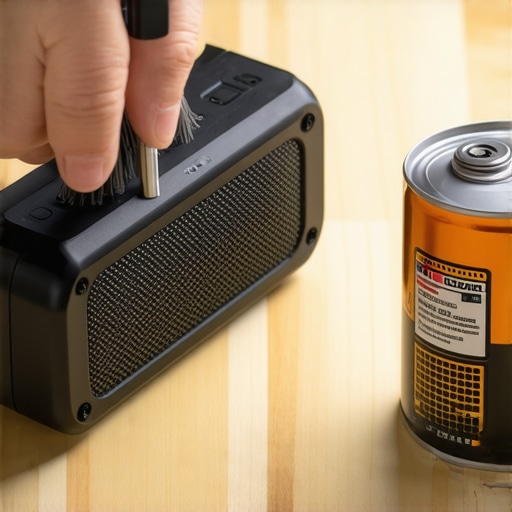
Sync Your Gear Without Buying a Whole New System
If your single speaker isn’t cutting it anymore, don’t feel like you have to drop $500 on a massive outdoor party box just to get more volume. The future of audio is increasingly modular. I’m a huge fan of “daisy-chaining” or using manufacturer apps to link multiple smaller units together. Learning how to sync two different bluetooth speakers for a party can give you a much wider soundstage and better volume coverage without redlining any single unit’s battery. I predict that over the next few years, we’re going to see the mass adoption of Bluetooth Auracast, which will make this process seamless across different brands, effectively ending the era of closed ecosystems. We are moving toward a world where “brand compatibility” matters less than open-sharing protocols. Before you go, I want you to try this one specific trick: check your speaker’s companion app for a firmware update. Manufacturers often release silent updates that optimize the power-draw algorithms of the internal DSP. It’s the easiest way to “gift” yourself an extra thirty minutes of playtime for free. Have you checked for an update lately?
Lessons from My Dead Speaker Graveyard
I’ve spent years tinkering with audio gear, and I have learned some hard truths about battery health the expensive way. First, the ‘always-on’ trap is real; keeping your speaker docked 24/7 suffocates the lithium chemistry through constant high-voltage stress. Second, be aware of software vampires. Sometimes the reason why your bluetooth audio quality drops when you open a mic app is linked to your device’s processor working overtime, which in turn causes the speaker to work harder to maintain a stable connection, draining the battery faster. Third, temperature management is the single most important factor for longevity. If you leave your gear in a hot car, you’ll quickly realize that why your cars aftermarket radio is draining your battery overnight is often due to heat-induced idle drain, a principle that applies to your portable speakers just as much as your vehicle’s electronics.
The Audio First-Aid Kit I Keep in My Drawer
Maintaining high-performance audio doesn’t require a degree, just the right tools. I always keep a can of DeoxIT D5 nearby. Much like how to fix a scratchy volume dial with electrical contact cleaner, applying a microscopic amount to your charging pins once a season can prevent oxidation and ensure you are getting the most efficient current transfer possible. I also recommend repurposing tech; I’ve found that learning how to use an old phone as a dedicated high-res music player can actually save your speaker’s battery, as it provides a cleaner, more stable signal without the background ‘noise’ of dozens of smartphone apps. Finally, for those who love beach trips, keep a UV-protectant spray handy to protect the chassis, similar to how to restore a sun-faded speaker grille to look new again, because a healthy exterior often reflects a well-protected interior.
Don’t Let a Silent Battery Kill the Vibe
Taking care of your portable speaker doesn’t have to be a chore. It’s about building those small habits—like avoiding extreme heat and using the correct chargers—that prevent your lithium cells from giving up when you’re in the middle of a perfect backyard jam. Your gear is an investment in your lifestyle, and with a little bit of preventive maintenance, you can ensure it stays loud and clear for years to come. Have you ever had a speaker die right in the middle of a perfect song? Let me know which model it was and how you handled it in the comments below.